Tags
The mental model for tag extraction is as follows:
Wiktionary
  │
  │ (wiktextract)
  │
  ├─>   raw_tags
  │     ↓      ↓
  └─> tags / topics
        ↓
   tag processing (which tags to keep, their short forms etc.)
        ↓
   tag sorting (only for inflection tags)
        ↓
   tag formatting (global css)
        ↓
   (optional, custom css in yomitan)
        ↓
   shown tag in yomitan
Overview
Wiktextract extracts three types of tags:
raw_tags: original language tags as they appear on Wiktionary (e.g. αρσενικό)tags: normalized, English-translated tags (e.g. masculine)topics: normalized, English-translated tags (e.g. Music), concerning general activities.
raw_tags are converted to tags and topics by wiktextract. We don't use the raw_tags directly, because they basically can be anything, including wiktionary editors mistakes. Working only with tags is the more reliable choice.
Wiktextract tags and topics can end up in multiple parts of a main dictionary entry:
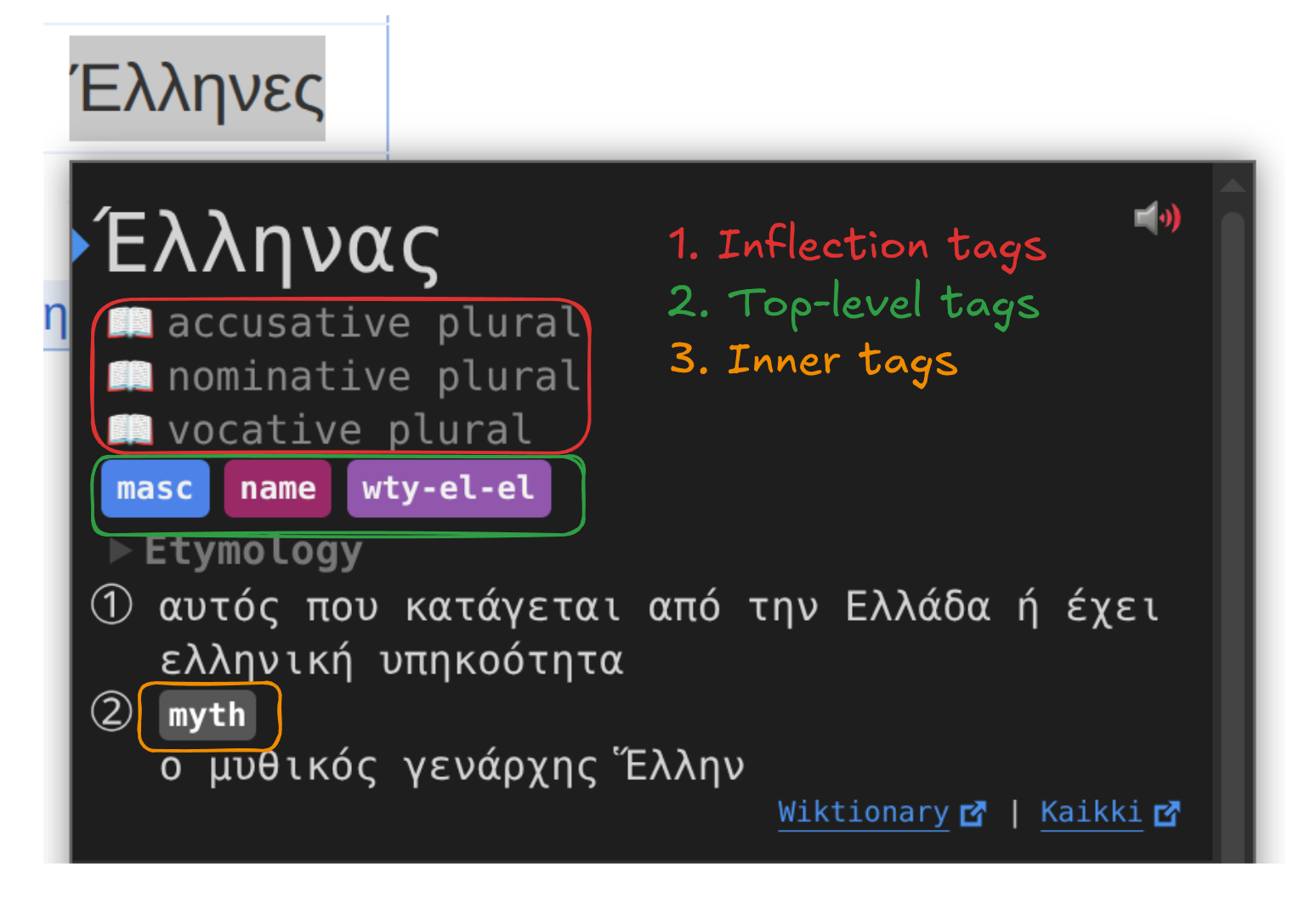
Even though topics happen almost exclusively as inner tags, a wiktextract tag can be used as any of the three.
CSS
See the relevant section in css.
Tag order
In the main dictionary, tag order depends on its type:
- Inflection tags: we sort them ourselves when building the dictionary, using
assets/tag_order.json. While this file has categories (formatility, cases etc.), those are later strip and serve only as visual help. The sorting is done with the flattened list. Tag postprocessing is only done for forms after building the whole intermediate representation, to only sort once with every extracted tag. The relevant function issrc/dict/main.rs::postprocess_forms. They appear in the order they are in the dictionary. - Top-level tags: are sorted by yomitan based on
sortingOrder(see below) of thetag_bank_term_1.jsonshipped with the dictionary. The relevant yomitan code can be found here. They may NOT appear in the order they are in the dictionary. - Inner tags: we sort them ourselves when building the dictionary based on
sortingOrder. They appear in the order they are in the dictionary.
Tag processing
Tag processing is ruled by tag_bank_term files. Currently, there are two: assets/tag_bank_term.json and assets/tag_bank_term_variety.json, separated only for visibility, but later merged via the build script in tag_constants.rs. The items of this JSON list are a custom version of:
type TagInformation = [
  tagName: string,
  category: string,
  sortingOrder: number,
  notes: string,
  popularityScore: number,
];
where notes is replaced with either a string, or a list of strings representing aliases, the first one being shown when hovering the tag.
For example, this tag information:
[
    "abbv",
    "",
    0,
    [
        "abbreviation",
        "abbrev"
    ],
    0
]
will convert both the wiktextract tags abbreviation and abbrev into abbv, and show abbreviation when hovered in yomitan.
Here is an example of a simple commit to add the "Buddhism" tag, that modifies the JSON, then runs the build script to update the rust code. Other example adding multiple tags here.
Run the build script after any modification to update the rust code: either just build or python3 scripts/build.py
Debugging
These are some steps to debug why a Wiktionary tag may not appear in yomitan:
- Is the Wiktionary tag really a tag? Sometimes badly formatted text, or a wrong template may look like a tag but it is not.
- Is the Wiktionary tag being extracted by wiktextract? Check the Kaikki link on the popup bottom-right to confirm.
- Is the Wiktionary tag being extracted as a
raw_tag? If it doesn't, see this issue, and the associated PR in wiktextract to have a grasp on how to request/add translations. - The tag is in wiktextract, but not in the dictionary? Check if the tag is whitelisted in any
tag_bank_termfile. - The tag is whitelisted, but not in the dictionary? Finally our problem, please open an issue.
Localization
To add or update tag localization for a language, create a file named tags_{iso}.json in the appropriate directory (e.g. assets/tags/locale/tags_ja.json for Japanese).
The file maps English canonical tag names to their localized equivalents:
{
    "noun": ["名", "名詞"],
    "verb": ["動", "動詞"],
    "transitive verb": ["他動", "他動詞"]
}
Each entry is a pair of [short, long] forms, where short is shown in the dictionary and long is shown on hover.
The short field can be left empty, in which case we default to using long at both places.
The key must match the 4th field of the corresponding entry in assets/tag_bank_term.json.
When that field is a string, use it directly. When it is an array, use the first element (the primary alias):
["v", "partOfSpeech", -1, "verb", 1]
→ key is "verb"

["vt", "partOfSpeech", -1, ["transitive verb", "transitive"], 1]
→ key is "transitive verb", not "transitive"
Run the build script after any modification to update the rust code: either just build or python3 scripts/build.py
Localization is automatically applied to every dictionary that uses that language as its target. You do not need to localize every tag: any tag without a localization entry will fall back to English.
Tips
On how to write a tags_{iso}.json localization file.
- Start with a simple subset. If you are familiar with the dictionary, localize the most common tags first. You can also localize a common category like
partOfSpech - (For finding the English long tag) Be familiar with long tag forms of
assets/tag_bank_term.json. Reminder that you only need to localize the first element. If the tag is not yet localized, the English long tag is displayed on hovering a tag. - (For finding the localized long tag) You can check what wiktextract does when translating
raw_tagstotags/topicsand do the inverse. For instance, this is the relevant file for Japanese, and this one for Greek. To chose between aliases that get normalized in wiktextract, consulting Wiktionary can be a solution (and sometimes, they happen to document it), but ultimately is a matter of personal taste. - (For Japanese) Because of the Japanese-focused roots of yomitan, one can take inspiration of the official JMDict page (found in the yomitan wiki)
- (For finding the localized short tag) One can take inspiration, among other places, from wordreference abbreviations. Here is the one for Japanese, and this one for Greek.